Is WordPress abandoning classic sites for blocks and AI? No — but its center of gravity has moved. The future of WordPress is block-based and AI-integrated: blocks are now the default editing experience, WordPress 7.0 “Armstrong” (May 2026) built a provider-agnostic AI framework into core, classic themes remain supported, and real-time collaboration plus responsive style editing lead the roadmap toward WordPress 7.1 and 7.2. The transition to blocks and the “Site Editor” interface is becoming the new foundation of WordPress. Even classic themes are seeing significant changes, with features like block-based widgets, a core-integrated site logo block, and the ability to insert block patterns.
What does this mean for site owners, developers, and everyday users? No matter if you’re using a classic theme or embracing the excitement of full-site editing, WordPress is evolving to make customization more flexible and intuitive.
This post covers the latest on WordPress’s transition, including what’s new, what’s changed with WordPress 7.0, and what’s coming next.
The ongoing transition to blocks
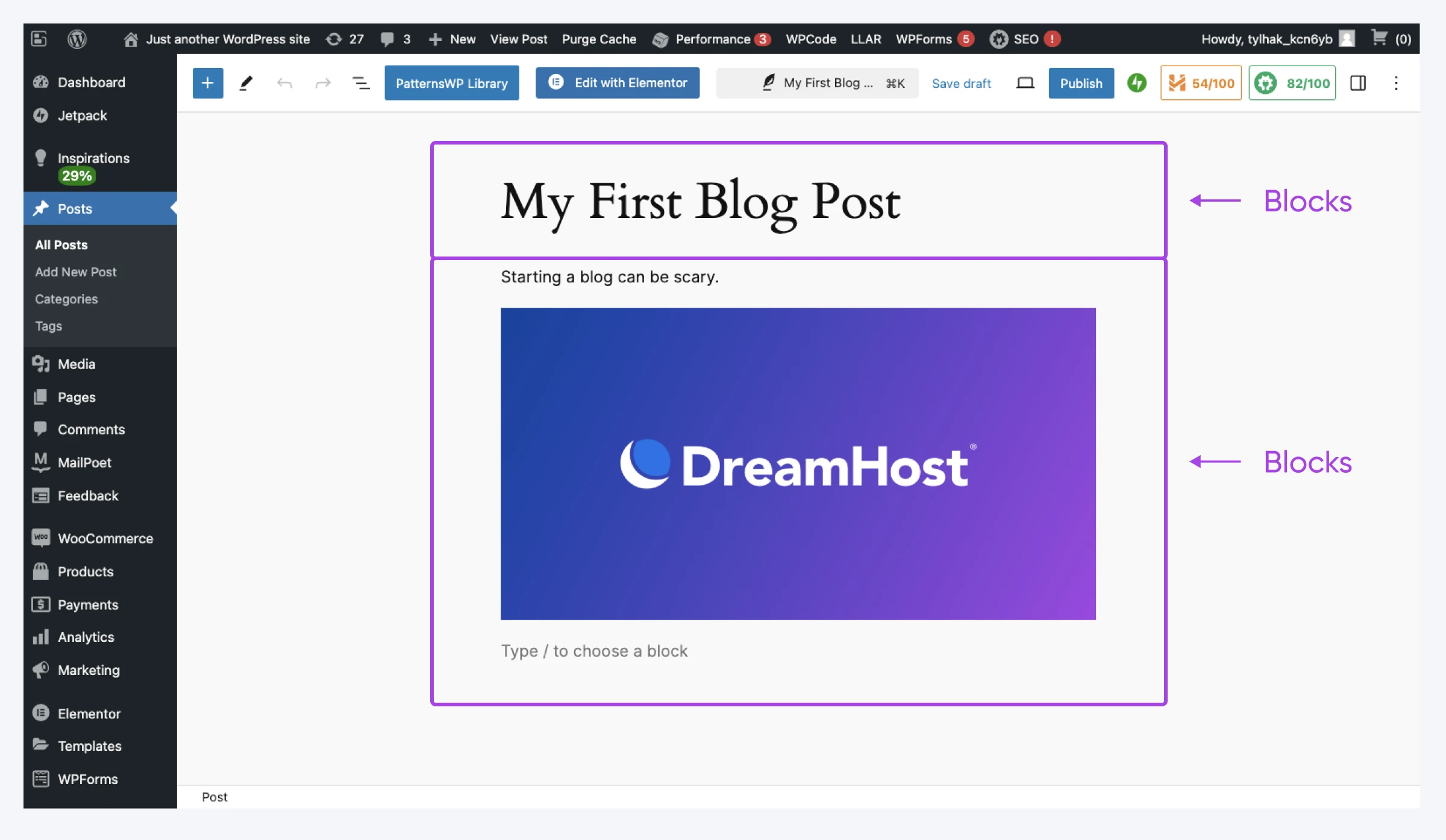
As of mid-2026, WordPress has made the block editor its default and continues its steady transition toward a fully block-based experience, emphasizing flexibility and user control over site design and content management. The scale of that shift is hard to overstate: WordPress runs 41.2% of all websites, per W3Techs (August 2026). Blocks are no longer limited to just posts and pages. They’re now a part of nearly every aspect of WordPress — from widgets to global settings.
What’s the future of WordPress?
The short answer: more collaboration, more AI, and design tools that keep moving into the Site Editor. The biggest item on the roadmap has already arrived: WordPress 7.0 “Armstrong” shipped on May 20, 2026 — the largest core update since Gutenberg. It brought AI into core through a provider-agnostic AI Client (building on the Abilities API introduced in WordPress 6.9), managed from a new Connectors screen that supports Anthropic, Google, and OpenAI. It also began the admin’s first major redesign since 2013, added Visual Revisions (a color-coded view of exactly what changed between saves), and upgraded Notes — WordPress’s block-level commenting feature — with email notifications and a suggestions mode. The one headline feature that didn’t make it was real-time collaboration, which was postponed for stability work shortly before launch.
The four phases of the Gutenberg roadmap
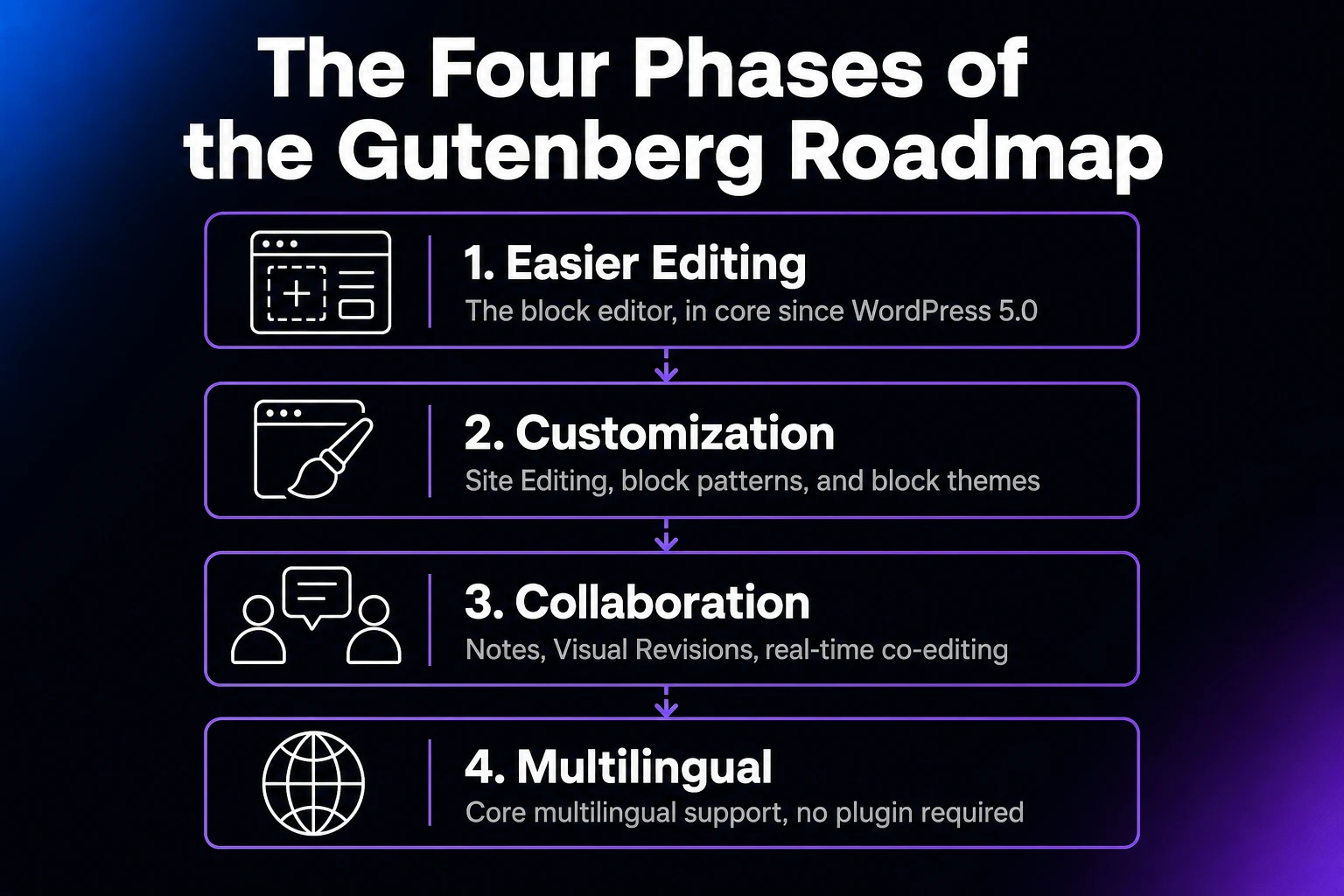
WordPress plans its own future in public. The official WordPress roadmap frames everything around the Gutenberg project’s four phases:
- Easier Editing — the block editor, in core since WordPress 5.0 and still improving
- Customization — Site Editing, block patterns, the block directory, and block themes, which culminated in the Site Editor’s launch in WordPress 6.3
- Collaboration — the current phase: Notes, Visual Revisions, and the eventual return of real-time co-editing
- Multilingual — still ahead: a core implementation for multilingual sites, no plugin required
The same roadmap lists the project’s big-picture goals for 2026: deliver three major releases, embed AI across the WordPress experience with clear guardrails, and grow local meetups and the contributor pipeline.
The 2026 release schedule: WordPress 7.1 and 7.2
Two more major releases are planned for 2026, per the official roadmap. Both dates are projections for rough planning, so expect some wiggle:
- WordPress 7.1 — August 19, 2026. The Roadmap to 7.1 (make.wordpress.org, June 19, 2026) slates richer Notes (an iterated suggestion mode and emoji reactions), new responsive styling and pseudo-state styling options in the Site Editor, and continued AI Client work for plugin authors. Real-time collaboration remains an active focus area (you can still test it in the Gutenberg plugin), with a dedicated outreach effort to give collaborative editing the testing it needs.
- WordPress 7.2 — December 10, 2026. The year’s third major release, closing out the roadmap’s stated 2026 goal of three majors.
AI in WordPress: the AI Client, Abilities API, and “AI Everywhere”
AI is no longer a plugin niche in WordPress: it’s core infrastructure and a named project goal. The 2026 roadmap commits to “AI Everywhere, With Clear Guardrails and Benchmarks”: intentionally embedding AI across the WordPress experience while establishing project-wide guidelines for transparency and user control.
The plumbing shipped in stages. The Abilities API (introduced in WordPress 6.9) lets plugins and themes describe what they can do in a format AI systems understand. The AI Client (new in 7.0) is the universal adapter: one provider-agnostic way for WordPress code to talk to generative AI models, so developers write against a single standard instead of wiring a separate plug for every provider. The Connectors screen is where you choose what plugs into that adapter, keeping your API keys in one place, with Anthropic, Google, and OpenAI as the three presets. Nothing runs by default: WordPress doesn’t send prompts or data to any AI service until you connect one. An optional AI plugin adds the first user-facing features, like generating images, titles, excerpts, and alt text, and a growing catalog of AI-powered plugins is expected to build on the same foundation.
The Role of Popular Page Builders in the Block Evolution
While WordPress is pushing the adoption of the “Site Editor,” some of the most popular page builders have also begun integrating block-like functionalities. Builders such as Elementor, Beaver Builder, and Divi have incorporated features that align with WordPress’s block system, making the transition smoother for users who rely on these tools.
Global Styles and Theme Building
Many page builders now offer global styling options similar to WordPress’s “Global Styles” in the “Site Editor.” These allow users to set consistent typography, colors, and layouts across their websites, reducing the need for manual adjustments on each page. This mirrors the block-based approach of Full-Site Editing, where styles can be managed site-wide without relying on theme customization options.
Reusable and Dynamic Blocks
Some builders have adopted reusable content elements that function similarly to WordPress’s reusable blocks. Users can create dynamic sections and templates that can be applied across different pages, ensuring consistency and simplifying site management.
Integration With Block-Based Features
To stay compatible with WordPress’s direction, many builders now interoperate with block-based sites instead of fighting them, supporting block themes, template parts, and hybrid setups where builder layouts and native blocks coexist.
These advancements show that while WordPress is moving toward a native block-based experience, page builders are developing to complement and integrate with this shift rather than resist it.
Full-Site Editing and the Site Editor interface
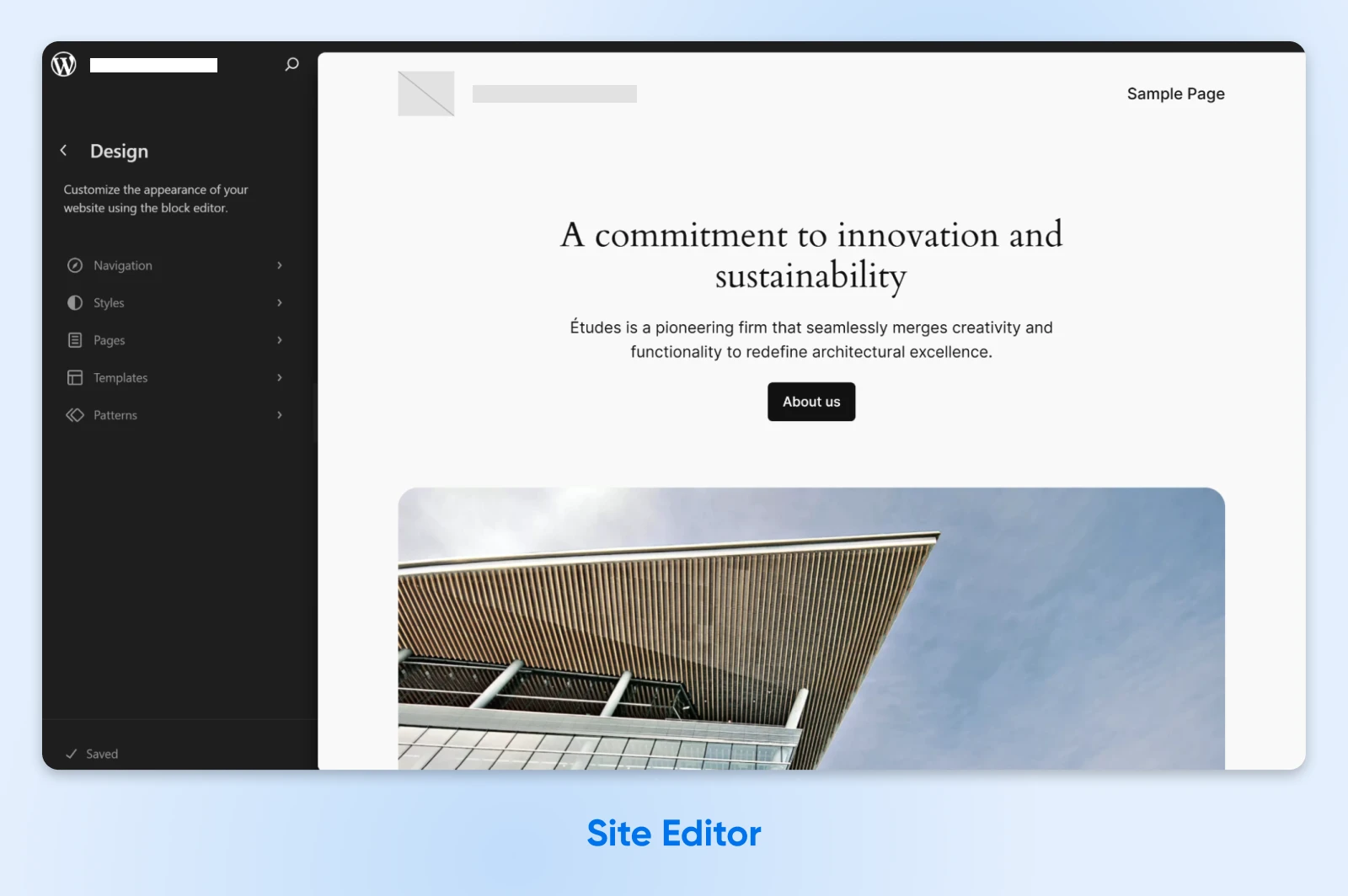
The “Site Editor,” a central component of Full-Site Editing (FSE), empowers users to design and customize their entire website using blocks. You can edit templates, individual parts like headers and footers, and the site’s global styles for a simpler, more intuitive site-building experience.
Unlike the traditional theme system, which requires modifying theme files, the “Site Editor” allows for real-time customization within the WordPress interface. Users can create custom layouts, apply site-wide design changes, and fine-tune every aspect of their site — all without touching a single line of code.
What does the future of WordPress website design look like?
The future of WordPress website design is the Site Editor: block themes and Global Styles already handle site-wide design visually, and the Roadmap to 7.1 (make.wordpress.org, June 19, 2026) adds responsive styling and pseudo-state styling options you can set without writing CSS. Design decisions keep moving out of theme code and into the visual editor, and that direction isn’t reversing.
Are there plans to stop supporting classic themes?
As of mid-2026, WordPress 7.0 continues to support classic themes — its new font-management screen explicitly works with block, hybrid, and classic themes alike. Classic themes, which use PHP templates and traditional customization methods, continue to be widely used and supported across WordPress sites.
In May 2023, a proposal was introduced to retire older default themes — specifically, those that have been supported for a minimum of five years and are active on fewer than 1% of all WordPress sites. This proposal aimed to simplify maintenance efforts and focus on more modern themes. But, even for themes designated as “retired,” the proposal would keep security updates coming, though no regular feature enhancements.
Note that “retired” in this context refers to a reduction in active maintenance, such as feature updates and enhancements, rather than complete abandonment. Users of retired themes can continue using them, but they’re encouraged to consider updating to newer themes to take advantage of the latest features and improvements.
So, while WordPress is actively promoting the adoption of block themes and the “Site Editor” interface, classic theme support continues. Users can continue to use classic themes, though they may not receive the same level of feature updates as newer, block-based themes.
What should you do with your site right now?
Support isn’t the question — timing is. Here’s the practical read for the three situations most site owners are in:
- You run a classic theme: No forced migration. Keep it updated, and plan a move to a block theme at your next redesign rather than as an emergency. A hybrid theme (a classic theme that opts into block features like the Font Library and patterns) is a reasonable middle step.
- You run a page builder: Stay put. As covered above, Elementor, Beaver Builder, and Divi interoperate with blocks and block themes, so you can adopt native blocks section by section instead of rebuilding.
- You’re starting a new site today: Start with a block theme and the Site Editor. New features like responsive styling land there first, and you skip a migration later.
Whatever you run, test big changes on a staging copy before touching the live site.
Is WordPress still worth learning in 2026?
Yes — WordPress is still worth learning and building on in 2026. It runs 41.2% of all websites, per W3Techs (August 2026), it has a published release schedule through December 2026, and the skills transfer: nearly a third of WordPress sites run Elementor and nearly a fifth run WooCommerce (31.5% and 19.8% respectively, per the same W3Techs survey), so block-editor fluency carries straight into client work and store builds. Platforms with that kind of footprint don’t disappear; they evolve.
The honest trade-off: the block transition means relearning parts of a workflow you may have used for years, and a hosted site builder can be simpler for a small brochure site. What WordPress gives you in return is ownership: open-source code under the GPL, your data on your own hosting, and no lock-in to a proprietary platform.
WordPress is transitioning to a fully block-based system, giving users more control and flexibility over website design and content. No matter your level of involvement — site owner, developer, or casual user — leaning into that change means a more modern, powerful, and user-friendly WordPress experience.
FAQs about the future of WordPress
Will classic themes stop working?
No. Classic themes still work and remain supported in WordPress 7.0, whose new font management page explicitly supports block, hybrid, and classic themes. Expect fewer new features than block themes get, not a shutdown.
What’s new in WordPress 7.0?
WordPress 7.0 “Armstrong” (May 20, 2026) added a provider-agnostic AI Client and Connectors screen, began a full admin redesign, and introduced Visual Revisions plus Notes upgrades. Real-time collaboration was postponed shortly before launch.
Are blocks replacing page builders?
Not outright. Elementor, Beaver Builder, and Divi now interoperate with blocks, block themes, and hybrid setups rather than fighting them. Native blocks cover more ground with every release, but builders remain a supported, actively developed path.
When is the next WordPress release?
WordPress 7.1 is planned for August 19, 2026, and WordPress 7.2 for December 10, 2026, per the official WordPress roadmap (both projections). Upgrades catch on quickly: version 7 already runs on 54.5% of WordPress sites, per W3Techs (August 2026).
Who decides the future of WordPress?
WordPress is open-source software licensed under the GPL, built by a global contributor community, with many contributors sponsored through programs like Five for the Future. The WordPress Foundation holds the trademark, and direction is set publicly through the Make WordPress teams and the official roadmap.

Unbeatable WordPress Hosting
Reliable, lightning-fast hosting solutions specifically optimized for WordPress.
See More