Bunny CDN. BUILT INTO DreamHost.
Your website.
Faster everywhere.
Give your store, portfolio or business website faster file delivery. Bunny CDN keeps copies of your images, videos and other files closer to visitors around the world. Enable it and manage it in your DreamHost panel.
Essential CDN is included with every DreamPress plan.
Other hosting plans: from $9.95/month per site.

Files are stored as visitors request them.
the Americas
Europe
Asia
A WORLDWIDE NETWORK. A NEARBY CONNECTION.
Bring your website
closer to your visitors.
Every visit starts with someone waiting for your website to load. A CDN can deliver your images, videos and site files from a server closer to that person.
When a nearby server has a cached copy, it sends that file straight to your visitor. Your hosting has fewer repeat requests to handle, and your content has less distance to travel.
Especially useful for image-heavy websites and audiences spread across countries. A small, mostly local site may see less difference.


A saved copy, ready to send.


Performance depends on your website. DreamHost reports a 35–42% improvement in its Bunny CDN testing. Your results will vary with location, content and caching. Read the published summary ↗
START WITH YOUR HOSTING
Compare CDN plans
for your website.
Select your hosting type to see your monthly price. Compare delivery locations and how much data each plan can send to visitors.
Monthly billing USD
Essential is included with DreamPress. Ultra and Max are optional monthly upgrades, per site.
$0extra /mo
Included with your DreamPress hosting.
$7.50/mo
Monthly DreamPress upgrade, per site.
$10.00/mo
Monthly DreamPress upgrade, per site.
Paid CDN plans renew monthly until canceled. Hosting is billed separately. Review your plan and total in the panel before purchasing. Annual CDN subscriptions are not available. How upgrades work ↗
IN EVERY CDN PLAN
Faster, safer file delivery
in every plan.
Image optimization
Compress and resize images for faster delivery.
SmartEdge routing
Direct traffic through the network efficiently.
DDoS protection
Help block attacks that try to overwhelm your site with traffic.
SafeHop
Send requests to another server if one has an issue.
Keep an extra stored copy. Perma-Cache adds file storage between your hosting and the CDN. Replication means keeping that stored copy in more than one region—up to three with Max—so the CDN can fetch files without returning to your hosting as often.
See how it works ↗CLOSER IS THE POINT
10 locations or 119.
Choose your reach.
Reach a worldwide audience with Essential. Choose Ultra or Max for more places to deliver your files.
Essential Core Edge
10 locations4 in the US · 3 in Asia · 2 in Europe · 1 in South AmericaUltra + Max Infinite Edge
119 locationsMore places to connect with a global audience.

SEE WHAT YOUR CDN IS DOING
See where your traffic goes
and how fast files load.
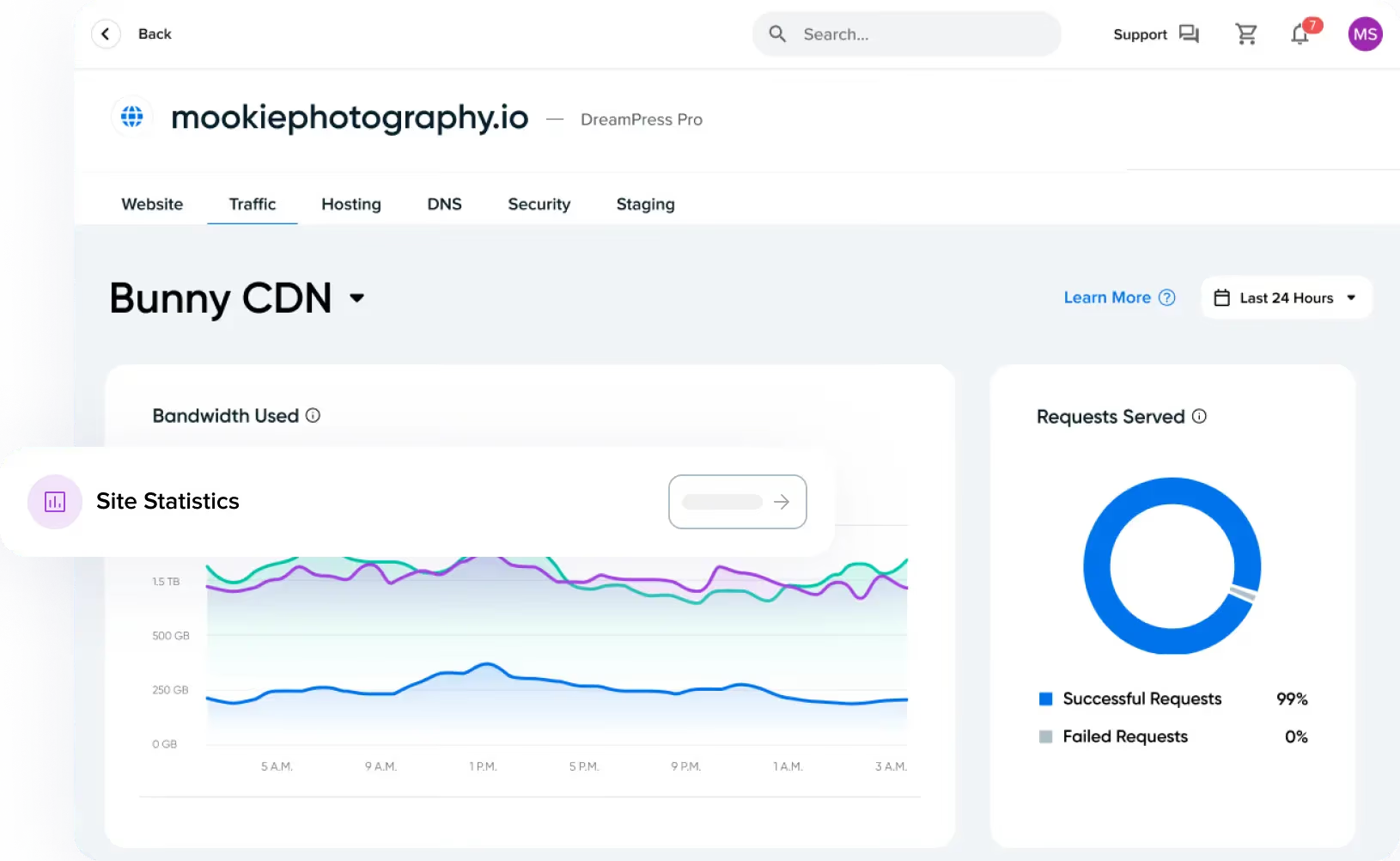
Open the Bunny CDN tab in your website’s Traffic dashboard to understand how content reaches your visitors.
Know what’s coming from cache.
Compare data sent from saved copies with data fetched from your hosting.
Find your audience.
See bandwidth use by country.
Spot changes worth a closer look.
Review response times and request errors.
YOUR NEXT STEP IS IN THE PANEL
Enable your CDN
in the DreamHost panel.
1. Choose your website.
Open Manage Websites, find your domain and select Manage.
Manage Websites Manage2. Enable Bunny CDN.
Go to Settings → Performance. DreamPress customers select Enable. On other plans, select Explore to choose a CDN plan.
Settings Performance3. Check your connection.
Configuration can take up to 20 minutes. After activation, use your panel to manage the plan, clear the cache or review traffic.
Follow the setup guide
You need active hosting and a supported domain. Temporary domains, staging sites and dreamhosters.com subdomains aren’t eligible. Start with DreamHost-managed DNS; third-party DNS needs additional configuration. Already using another CDN proxy? Check your setup with support first.
NEED HOSTING TOO?
Find hosting
that works with your CDN.
DreamPress includes Essential CDN. Bunny CDN is also available as a paid add-on for other DreamHost hosting plans.
Explore DreamPressYour CDN questions, answered.
A content delivery network stores copies of your website’s files on servers around the world. Bunny CDN can serve cached content from a location closer to each visitor, reducing requests back to your hosting server.
Serving cached files closer to visitors can reduce the distance those files travel. Essential uses 10 locations; Ultra and Max use 119. Actual performance depends on the site, the visitor’s location and whether content is already cached.
In the same Performance section, choose Manage Plan beside Bunny CDN. Select a plan and review the order before checkout. Existing CDN settings stay in place when you upgrade. You can also downgrade through Manage Plan.
Avoid running Bunny CDN alongside another CDN proxy without reviewing your configuration. An external DNS provider is a different question: it requires extra setup. See the third-party DNS guide or ask support for help.
It can help when your audience is spread across countries or your pages contain lots of images and other files. Image optimization, efficient routing and caching support faster delivery. A small site serving a mostly local audience may see less benefit.
Open Manage Websites in your DreamHost panel, choose your site, then go to Settings → Performance. DreamPress customers can enable the included Essential plan. On other hosting plans, choose Explore to review paid CDN options. Follow the setup guide.
CDN subscriptions are monthly and renew automatically until canceled; annual billing is not available. Pausing CDN delivery keeps your settings and routes traffic through your hosting server, but it does not stop billing. Read the management guide.
Yes. Chat may start with AI, and you can ask for a person. Use for help choosing, or your support panel for help with an existing account.
STILL POWERED BY HUMANS
CDN questions?
We’re here to help.
Get help from people who know your hosting.
Talk through your hosting setup, choose your CDN plan or get help understanding what you see in the panel.
Sales chat and customer support are available 24/7.
Chat may start with AI. You can ask for a person.